# Build an app locally
Build an app on your own computer when you want your own editor, your own agent or your own Git workflow. Keboola still hosts and runs the app: it clones the repository, installs dependencies, starts the app and serves it behind a secure URL. You don't manage servers, ports or Docker, only your code and a small configuration folder.
There are two ways to do it:
- [With an AI agent](#with-an-ai-agent): an agent on your computer reads your data, writes the code, creates the app and deploys it from one prompt.
- [By hand](#by-hand): you write the code and create the app yourself, from a terminal with kbagent or from the Keboola UI with your own repository.
To build inside Keboola instead, [Kai](/data-apps/getting-started/) does the same from the **Create App** screen, with a live preview. For what the Python/JS stack can do (frameworks, full-stack, APIs for agents), see [What are Keboola apps](/data-apps/what-are-apps/#the-stack-pythonjs).
**Before you start**
You need:
- **A Keboola project.** No project yet? Create a free one (https://connection.us-east4.gcp.keboola.com/wizard).
- **A table in Storage** with the data you want the app to show. No data yet? Download the sample opportunity.csv (/tutorial/opportunity.csv) and load it as in Manual Data Loading (/tutorial/load/#manual-data-loading), which takes a few minutes and gives you the table `in.c-csv-import.opportunity`; Describe the app (#describe-the-app) has a prompt for it. For your own data, use a data source connector (/components/extractors/).
- **Git,** which pushes the app's code.
Depending on how you build:
- **With an AI agent:** Claude Code, Claude Desktop, Cursor, VS Code or the ChatGPT app, and kbagent (/cli/) connected to that project. Connecting kbagent asks for your stack URL, the part of your project's address before `/admin`; for a free project from the link above, it's `https://connection.us-east4.gcp.keboola.com`. Creating the push token for the app's repository needs admin rights in the project. Using another agent? See Other agents (#other-agents).
- **By hand:** your local development tools. From a terminal, you also need kbagent, connected as above, and admin rights in the project for the push token; for your own repository, a Git account where you host it.
## With an AI agent
With the `dataapp-developer` plugin from Keboola's [AI Kit](/ai/ai-kit/), the agent reads your data, writes the code, creates the app with a Git repository that Keboola manages, pushes the code there and deploys it. You end up with a running app at its own URL, and the code in a repository you can keep changing.
**Building with an AI agent, in four stages**
1. **Set up your client (#set-up-your-client).** Connect your project and add the app-building plugin.
2. **Describe the app (#describe-the-app).** One prompt: what it shows, which data, where the code goes.
3. **The agent builds it.** It reads your data, writes code and deploys; you approve its commands.
4. **Check the app (#check-the-app).** On its page in Keboola, Open App has the URL and password.
### Set up your client
**Claude Code**
1. Add the AI Kit marketplace and the `kbagent` plugin, then run `/kbagent:setup` with [your stack URL](#before-you-start), which installs kbagent and signs you in. [kbagent with AI agents](/cli/for-agents/#claude-code) has the commands.
2. Add the app-building plugin from the same marketplace:
```
/plugin install dataapp-developer@keboola-claude-kit
```
3. Paste the prompt from [Describe the app](#describe-the-app). Approve the commands it asks to run, unless you've allowed them.
The plugin gives the agent a skill with Keboola's app layout, Storage access and deployment rules, plus app templates.
**Claude Desktop**
1. Connect Keboola's MCP server for your stack, as in [Using with Claude Desktop](/ai/mcp-server/#using-with-claude-desktop).
2. Open **Customise → Plugins → Add → Add from marketplace**, paste `keboola/ai-kit`, and add `dataapp-developer`. The same route installs the `kbagent` plugin; see [kbagent with AI agents](/cli/for-agents/#claude-desktop).
3. Start a new chat and paste the prompt from [Describe the app](#describe-the-app), with its first sentence changed to "Build a Keboola app through the Keboola MCP server." The skill prefers the MCP route in Claude Desktop, described in [The MCP route](#the-mcp-route); if it also finds kbagent, it asks which one to use. Without a way to push to Git, it builds a Streamlit app instead.
**Cursor**
1. Install kbagent and connect your project in a terminal, as in [First, in a terminal](/cli/for-agents/#first-in-a-terminal), using [your stack URL](#before-you-start).
2. Add the AI Kit marketplace as in [Cursor](/cli/for-agents/#cursor), with the full URL `https://github.com/keboola/ai-kit`. Under **Keboola Ai Kit**, add both `kbagent` and `dataapp-developer`.
3. Paste the prompt from [Describe the app](#describe-the-app) into Cursor's chat. Approve the terminal commands it asks to run.
If Cursor offers to sign you in to a `keboola` MCP server, decline to stay on kbagent. The plugin's own server points at the US GCP stack (`us-east4`), so signing in to it can send the agent to a project there.
**VS Code**
VS Code runs the agent through GitHub Copilot, so you need the Copilot extension with agent mode.
1. Install kbagent and connect your project in a terminal, as in [First, in a terminal](/cli/for-agents/#first-in-a-terminal), using [your stack URL](#before-you-start).
2. Install the plugins from source as in [VS Code](/cli/for-agents/#vs-code): run **Chat: Install Plugin from Source**, paste `https://github.com/keboola/ai-kit`, confirm the Trust prompt, and pick `kbagent`. Do the same for `dataapp-developer`.
3. Open the Chat view (`⌃⌘I`, or `Ctrl+Alt+I` on Windows), switch to agent mode, and paste the prompt from [Describe the app](#describe-the-app). Approve the terminal commands it asks to run.
**ChatGPT app**
1. Install kbagent and connect your project in a terminal, as in [First, in a terminal](/cli/for-agents/#first-in-a-terminal), using [your stack URL](#before-you-start).
2. Turn on **Developer mode** and add the marketplace as in [ChatGPT app](/cli/for-agents/#chatgpt-app), then install `kbagent` and `dataapp-developer` from the **Personal** tab. From a shell, that's:
```bash
codex plugin marketplace add https://github.com/keboola/ai-kit
codex plugin add kbagent@keboola-claude-kit
codex plugin add dataapp-developer@keboola-claude-kit
```
3. Start a new chat and paste the prompt from [Describe the app](#describe-the-app). Approve the commands it asks to run.
### Describe the app
Say what the app shows, which data it uses and where the code goes, and ask for a new, deployed app. Without the word *new*, the skill prefers changing an app that already exists. For example:
```text
Build a Keboola app using kbagent, not an MCP server, in the project kbagent
is connected to. It shows the number of orders per day as a line chart, from
the orders table. Put the code in a new Keboola-managed Git repository, deploy
the app, check that it loads its data, and give me its URL and its page in
Keboola (/admin/projects//data-apps/).
```
Swap the orders table and the chart for your own data and keep the rest as it is; the agent fills in the page link itself. If kbagent knows more than one project, replace "the project kbagent is connected to" with the project's alias, from the **Alias** column of `kbagent project list`. With the sample data from [Before you start](#before-you-start), use this one:
```text
Build a Keboola app using kbagent, not an MCP server, in the project kbagent
is connected to. It shows the number of opportunities created per month as a
line chart, from the in.c-csv-import.opportunity table (CreatedDate column).
Put the code in a new Keboola-managed Git repository, deploy the app, check
that it loads its data, and give me its URL and its page in Keboola
(/admin/projects//data-apps/).
```
The agent reads the skill, finds the table and queries a sample before it writes any code. Name a framework too if it matters to you. To use your own GitHub repository instead, put its URL in the prompt; the repository then has to follow the layout in the skill's [reference](https://github.com/keboola/ai-kit/blob/main/plugins/dataapp-developer/skills/dataapp-development/references/python-js-apps.md).
If the agent can reach Keboola more than one way, it may ask which to use, or offer to sign you in to an MCP server. Outside Claude Desktop, pick kbagent to follow this page and decline that sign-in. An MCP sign-in can reach other projects, and the agent may build wherever it finds the data first; that's why the prompt names both kbagent and the project. The plugin's own MCP server is fixed to the US GCP stack (`us-east4`): Claude Code can't connect to it, Cursor offers a sign-in, and the ChatGPT app's Codex engine reports that it needs one. [The MCP route](#the-mcp-route) describes the other way in.
### The MCP route
Through a Keboola MCP server, the agent doesn't run kbagent. It calls the server's app tools instead, such as `modify_python_js_data_app`, `create_python_js_data_app_git_credential` and `deploy_data_app`. To take this route on purpose, connect the MCP server for your stack: [Claude Desktop](/ai/mcp-server/#using-with-claude-desktop), [Cursor](/ai/mcp-server/#using-with-cursor), [VS Code](/ai/mcp-server/#using-with-vs-code), [ChatGPT](/ai/mcp-server/#using-with-chatgpt).
- It creates the app with a Keboola-managed repository, and a draft of it next to the production app.
- The draft runs in development mode at its own URL, so you preview the app before anything goes live. If the repository has a `keboola-config/supervisord-dev/` program, the draft reloads each push within seconds; otherwise the agent redeploys it. A draft can't be public, even if you asked for a public app.
- The production app stays undeployed until you approve the draft. Then the agent merges the draft into production and deploys it.
- The repository block is in the configuration from the start, so [the workspace bug](#if-the-app-cant-read-storage) doesn't apply.
### Check the app
- The agent finishes with the app's URL and its page in Keboola.
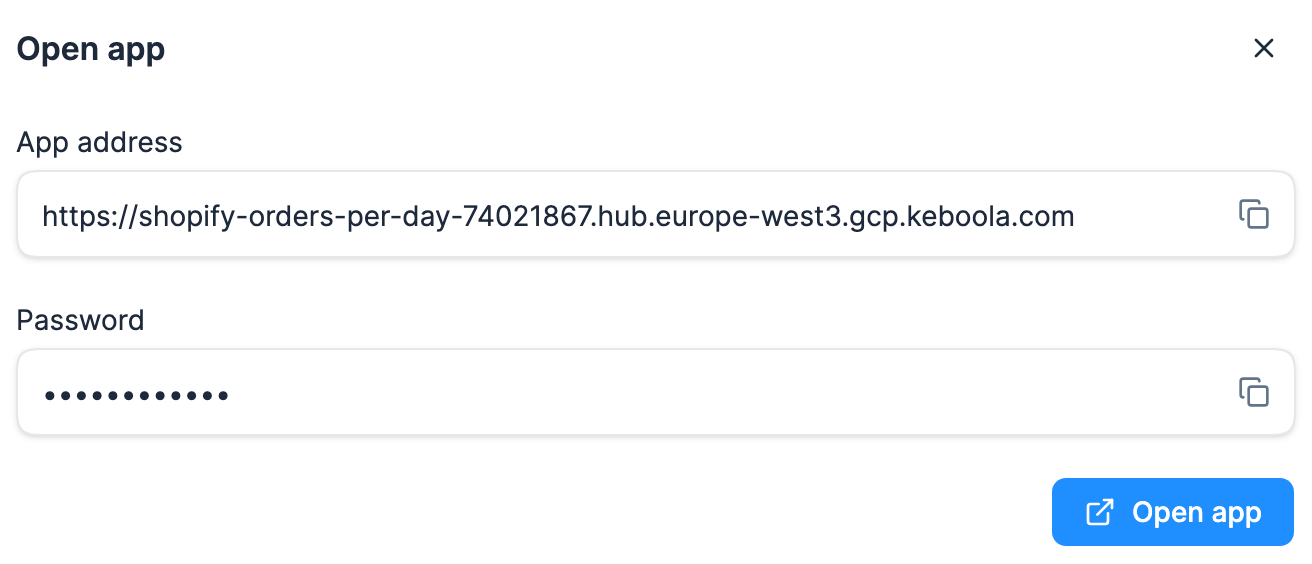
- The app asks for its password. On the app's page in Keboola, click **Open App**. The dialog has the app's address and its password, each with a copy button. Copy the password, then click **Open app** in the dialog.
- If the app opens without data, ask the agent to read the app's log. [Troubleshooting](/data-apps/troubleshooting/) lists the common causes, including `Promise.withResolvers is not a function` from a too-new `@keboola/api-client`.
- On [the MCP route](#the-mcp-route), you preview a draft at its own URL first. The production app gets **Open App** once you approve the draft and the agent deploys it.
- To let other people open it, see [Publish and share](/data-apps/publish-and-share/).
### What you get by default
Unless the prompt says otherwise, a dashboard comes out as a Python/JS app built with Node.js and Chart.js, with its code in a new Keboola-managed Git repository. The app runs at the XSmall size, sleeps after 15 minutes without visitors, gets access to your Storage data and sits behind a shared password. On the kbagent route, the app can read Storage only once the repository block is added; see [If the app can't read Storage](#if-the-app-cant-read-storage).
The agent usually can't show you that password, because `kbagent data-app password` needs a Manage API token. To find the app's page, open **Apps** from the left navigation and then your app. The example prompt in [Describe the app](#describe-the-app) asks the agent for a direct link to that page.
To make the app public, say so in the prompt. Anyone with its URL can then open it and see the data it shows. Changing an existing app's sign-in, including to single sign-on, belongs in its [Authentication](/data-apps/authentication/) settings.
### Other agents
Any agent that can run shell commands can follow [From a terminal](#from-a-terminal). For the push, it has to hand Git the token without a prompt, because an agent's shell can't answer one, and keep the token out of the push URL, where it would end up in the shell history. Many agents also start a new shell for each command, so a variable exported in one command is gone by the next. One command handles all of that: it creates the push token from step 3, reads the secret from kbagent's JSON output with `jq`, and pushes through a one-off credential helper, so the secret never appears in a command or its output:
```bash
GIT_PUSH_TOKEN="$(kbagent --json data-app git-credentials-create --project --app-id \
--type http_token --permissions readWrite --yes | jq -r .data.credential.secret)" \
git -c credential.helper= \
-c credential.helper='!f() { echo username=kbagent; echo "password=$GIT_PUSH_TOKEN"; }; f' \
push HEAD:main
```
It needs `jq`, and each run creates a new token, so use it in place of the `git-credentials-create` command in step 3. If the push fails with `Authentication failed`, run the kbagent part on its own to see its error, such as a 403 when kbagent's token lacks admin rights.
Have it load kbagent's full command reference with `kbagent context` first ([the context reference](/cli/for-agents/#the-context-reference)). If the agent can't install plugins, give it the skill as files: the folder is [on GitHub](https://github.com/keboola/ai-kit/tree/main/plugins/dataapp-developer/skills/dataapp-development), with the app templates and reference guides the skill points to.
### The skill as a download
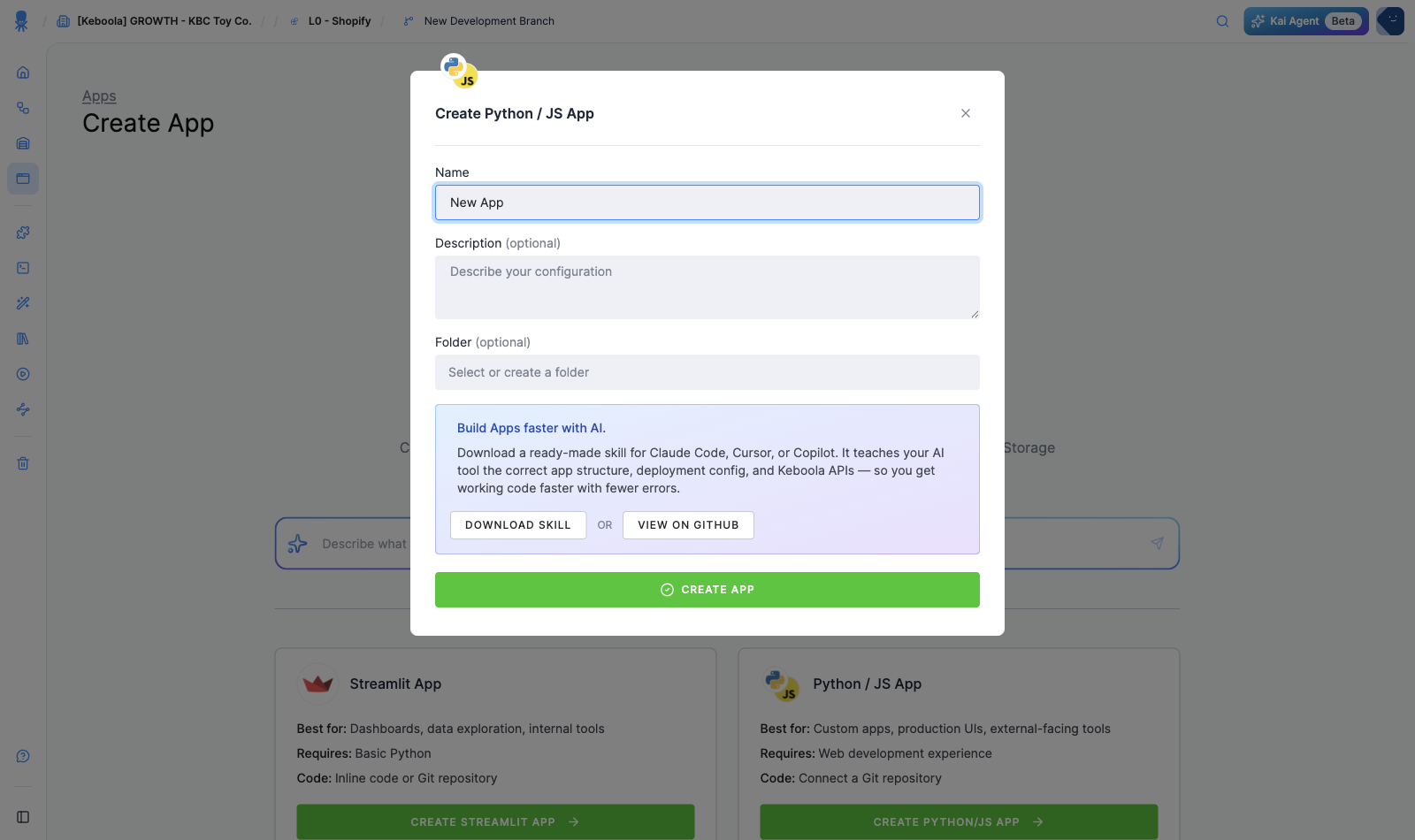
To add the skill to an agent by hand, download it below. The download is a copy of the skill folder: the skill itself, ready-made app templates (Python, Node.js, full-stack, Streamlit), and reference guides your agent can draw on. The current folder is [on GitHub](https://github.com/keboola/ai-kit/tree/main/plugins/dataapp-developer/skills/dataapp-development). When you create a Python/JS app in the UI, Keboola offers the skill too, **Download Skill** or **View on GitHub**, and the app's **Overview** links it as **AI Skill for Building**.
⬇ Download the app-building skill (with templates)
## By hand
Write the code yourself, then create the app from a terminal with kbagent, which gives it a Keboola-managed repository, or, in the Keboola UI, connect a repository you host.
**Building by hand from a terminal, in four stages**
1. **Write the code (#app-structure).** A standard web app, plus a small configuration folder.
2. **Create the app (#from-a-terminal).** kbagent creates it with a Keboola-managed repository.
3. **Push the code.** Commit and push it to the app's repository.
4. **Deploy and open.** Deploy, then click Open App on its page for the password.
### App structure
A Keboola app is a standard web app. The typical scaffold is:
- `src/App.tsx` for the frontend (React).
- `server/index.ts` for server-side API routes (Express).
All data-fetching logic, meaning SQL queries and anything that uses your Storage token, belongs in the server-side routes.
```ts
// server/index.ts — example route (illustrative)
app.get("/api/rows", async (req, res) => {
// Use the Keboola Storage client here, server-side only.
// Never expose your Storage token to the browser.
});
```
:::caution
`KBC_TOKEN` is injected automatically and must stay server-side. Don't add it as a secret yourself, and never send it to the browser.
:::
The repository also needs a small `keboola-config/` folder that tells Keboola how to start the app. The skill's [reference](https://github.com/keboola/ai-kit/blob/main/plugins/dataapp-developer/skills/dataapp-development/references/python-js-apps.md) spells it out.
### From a terminal
kbagent creates the app with a Keboola-managed repository, and you push your code there.
1. [Install kbagent](/cli/getting-started/) and [connect your project](/cli/getting-started/#step-2--connect-your-project) with [your stack URL](#before-you-start). Then `kbagent project list` shows three values you need: your project's name in kbagent (**Alias**, `` below), its **Project ID** (``) and its **Stack URL** (``).
2. Create the app. It prints the **App ID** (`` below) and the **Config ID** (``), and doesn't deploy yet, because the new repository is empty:
```bash
kbagent data-app create --project --name "Orders per day" --slug orders-per-day --use-managed-git-repo
```
3. Get the repository's HTTPS URL (``) and a push token. The token is a one-time secret, so save it now. An agent runs only the first of these commands and then pushes with the one in [Other agents](#other-agents), which creates the token without printing it.
```bash
kbagent data-app git-repo --project --app-id
kbagent data-app git-credentials-create --project --app-id --type http_token --permissions readWrite --yes
```
4. Commit your code and push it to `main`. Clearing Git's credential helper for this push makes Git ask for the token instead of sending a stored login, which fails with `Repository not found`. When it asks, use any username and the token as the password.
```bash
git -c credential.helper= push HEAD:main
```
5. Until [keboola/cli#765](https://github.com/keboola/cli/pull/765) ships, add the repository block to the app's configuration, or the app gets no Storage access ([why](#if-the-app-cant-read-storage)):
```bash
kbagent config update --project --component-id keboola.data-apps --config-id --merge --configuration '{"parameters":{"dataApp":{"git":{"repository":"","branch":"main","private":true}}}}'
```
6. Deploy, then print the app's URL:
```bash
kbagent data-app deploy --project --app-id --wait
kbagent data-app detail --project --app-id
```
The password is on the app's page, `/admin/projects//data-apps/`: click **Open App** and copy it from the dialog. With a Manage API token, `kbagent data-app password --project --app-id ` prints it too. If the app opens without data, `kbagent data-app logs --project --app-id ` shows its log; if it doesn't start at all, `kbagent data-app runs --project --app-id ` shows why.
### Sync to your project
To run the app from a **Git repository** you host, develop locally, push, and connect the repository in the UI:
1. In your project, create a **Python/JS app** (**Apps → + Create App → Python / JS**).
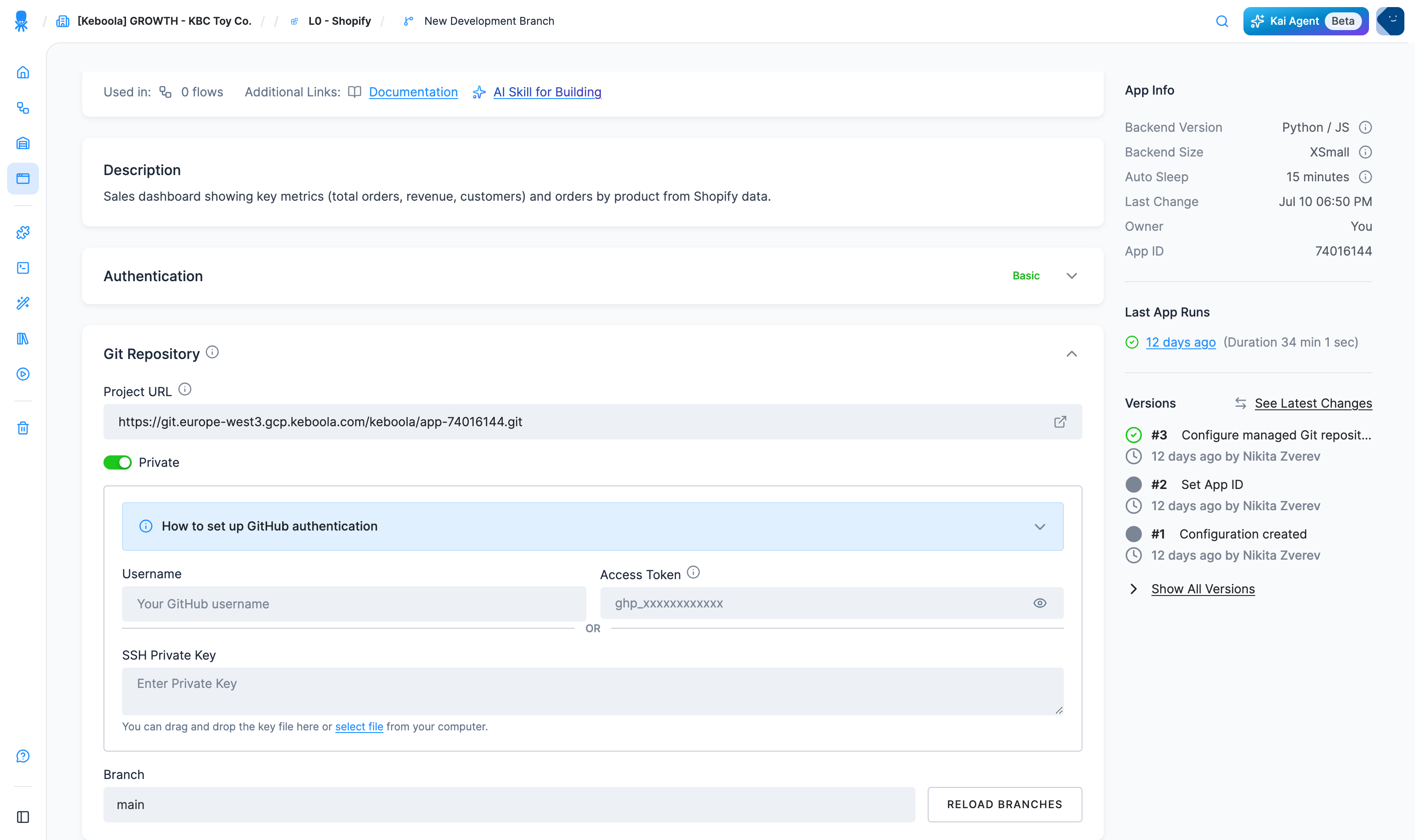
2. On the app's configuration page, open **Git Repository** and set the **Project URL**. For a private repo, toggle **Private** and add your credentials.
3. Pick the **branch** (**Load Branches**).
4. Click **Deploy App**. Keboola clones the repo, installs dependencies, and runs it. Push changes and **Redeploy** to ship them.
## How development works
The day-to-day loop, whichever way you build:
1. **Code lives in a Git repository**: yours, or a private Keboola-managed repository that Kai, kbagent or an MCP server creates for the app, such as `https://git.europe-west3.gcp.keboola.com/keboola/app-.git` with the App ID as `` (`kbagent data-app git-repo` prints the exact URL).
2. **Data access happens server-side.** Your backend queries Storage (Storage API or real-time SQL via the Query Service) using the auto-injected `KBC_TOKEN`, so the browser never sees the token. Environment variables and code patterns are in [Reference → Data access](/data-apps/reference/#data-access).
3. **Ship a change**: push to the connected branch and redeploy. If Kai built the app, just tell Kai what to change; if an agent built it, ask the agent.
4. **Debug on the app detail**: the app's page has **Overview / Advanced Settings / All Runs / Terminal Logs / Versions** tabs (a **Drafts** tab appears while a draft exists). Env variables, theme, and data mappings live under **Advanced Settings**. The app **sleeps when idle** and wakes on the next visit; drafts hot-reload as Kai edits.
## Access your data
Apps read Keboola data through Input Mapping, the Storage API, or Storage Access (real-time SQL via the Query Service). See [Reference → Data access](/data-apps/reference/#data-access) for environment variables, code patterns, and Storage Access setup.
## If the app can't read Storage
Until [keboola/cli#765](https://github.com/keboola/cli/pull/765) ships (still the case in kbagent 0.95.0), an app created with `--use-managed-git-repo` gets no workspace, however often you redeploy it with kbagent. It runs, but its code finds no `WORKSPACE_ID`. An app built from the plugin's Node.js template logs `Missing env vars: WORKSPACE_ID (or KBC_WORKSPACE_MANIFEST_PATH)`. Checking `runtime.workspace.enabled` in the configuration doesn't catch it, because that flag is already on.
The app's configuration is missing its repository block. The prompt above asks the agent to check that the app loads its data, so it should notice and add the block; kbagent's rules make it ask you to confirm that change first. If it doesn't notice, ask it to. By hand, it's step 5 of [From a terminal](#from-a-terminal), followed by another `kbagent data-app deploy`. If you no longer have the config ID from `create`, `kbagent --json data-app detail --project --app-id ` shows it as `config_id`. After the fix ships, `deploy` adds the block itself.
If the app still reads no data, or you didn't create it with kbagent, Storage Access may be off for the app or the project. [Troubleshooting](/data-apps/troubleshooting/) has the fix.
## Change the app later
If an agent built the app, ask it for the change. It pushes to the same repository and deploys again, and the app restarts on each deploy. To edit the code in a Keboola-managed repository yourself, clone it from `kbagent data-app git-repo` with a fresh token from `git-credentials-create`, clearing Git's credential helper as in steps 3 and 4 of [From a terminal](#from-a-terminal): `git -c credential.helper= clone `. With your own repository, push to the connected branch and **Redeploy**, as in [Sync to your project](#sync-to-your-project).
Stopping and waking the app, secrets, settings and deleting are in [Operate and update an app](/data-apps/operate/). kbagent's `data-app` commands don't cover drafts or copying an app, and `kbagent data-app deploy --config-version` runs an older configuration for one deploy without restoring it. Drafts, copying and a real [rollback](/data-apps/operate/#see-what-changed-and-go-back) happen in the Keboola UI.
---
**Next:** [Authentication →](/data-apps/authentication/)